

Having trouble with The Game of The Path? Let us help you out…
How do I play Vs. AI?
Once you have placed your first stone, drop stones on the AI Personality squares to the bottom right of the board to spawn computerized opponents.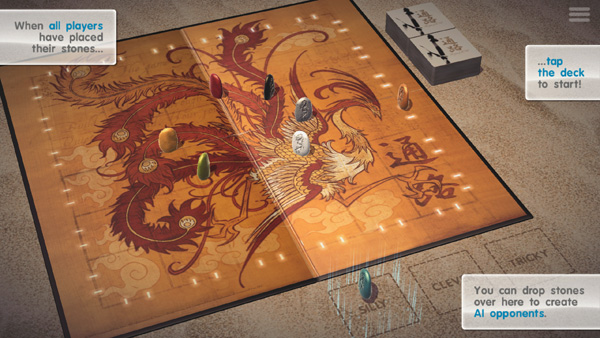
How do I play Vs. my friends sitting next to me? (Pass & Play)
After you have added the first stone... just add more!
How do I switch up the rules?
After you have placed a second stone, you can switch the rules by tapping the button on the bottom left of the screen.

Why can't I beat the freakin' Silly AI?
Bad luck. That's all.
Silly AI make moves at random, as long as they are safe. Stick to the center of the board and you'll make short work of the pesky little blighters.
Start off with one or two, then see if you can beat all seven for an achievement!
Can I play online without Facebook?
Yes! You can play over Game Center on iOS, and Google Play on Android.
How do I play online? Why can't I see the online buttons?
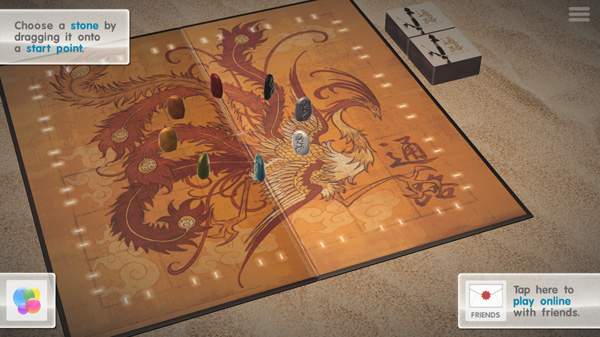
You may need to play a quick local game first to initialise online play. You should see a button on the bottom right of the screen.
Why can't I look at the board from above / start randomly / undo my move / etc?
Would you like to see a new feature? Send us an e-mail from the settings menu - they are all added to our feedback list, and prioritized for future updates. We can't guarantee anything, but we seriously evaluate all suggestions sent in to us. 🙂
Tsuro crashes on start-up. How do I fix it?
Most crashes are caused by a data mismatch (which can sometimes happen after an update). Please uninstall Tsuro to clean out any saved data, then reinstall it. That should alleviate any crashing.
How do I delete old multiplayer games?
Worry ye not! Old multiplayer games will automatically delete after 7 days of inactivity.
Will you be making Tsuro of The Seas?
That sure would be cool wouldn't it?
We can't talk about future projects, but we can tell you that our next game will Calliope's awesome dice game, Roll For It!
How do I activate Augmented Reality?
Tsuro's AR "Tabletop Mode" can be activated from the main screen, once you have completed the Tutorial. Look for a little table icon on the left of the screen.
And don't forget: you need at least an iPhone 6s, or a 2017 iPad, running iOS 11 for access to Apple's AR technology.
Why am I having trouble connecting to Facebook?
On iOS make sure you are logged in to the same Facebook account for...
- Your Facebook App
- Your device's settings
- Facebook.com on Safari
Why is the game chugging?
Are you on an older device? Try switching to Economy Graphics in the settings .
Why can't I play Game Center multiplayer with only two players?
There is a known bug with earlier versions of iOS 10 that will fill games with automatched players if they are not at maximum capacity.
To fix this, please update your device to the latest version of iOS.
Why can't I open the box? Why is the box black?
Something has gone wrong with your install. Try these steps:
- Close the app and restart it. If that doesn't work...
- Uninstall the app and then reinstall it.
Tsuro crashes when I start a solo game! What the heck?
Our bad - we must have missed this bug while testing. 🙁
Tsuro will indeed crash if you start a solo game with no internet connection. If you are online it will work perfectly. Keep in mind that apps can lose their connectivity if you switch to another app.
This bug is fixed in Version 1.5.
Tsuro sure likes to crash on my device - how can I fix this?
Sometimes your Apple device's memory can get bunged up with other apps, and the detailed graphics of Tsuro cause it to freak out. To fix this try the following...
- Double tap the home button on your device
- Swipe away all the open apps to close them
- Hold down the power button on your device
- Restart your device
- Play Tsuro
What does little number on top of the icon mean, and how do I clear it?
This number tells you how many online games are awaiting your turn.
You can clear it by deleting Game Center games, and/or "Ghosting" Facebook games.
Why are my stones all beige?
Something has gone screwy and you need to reinstall the app.
Why is my device getting hot?
Feel the burn of intense graphics! Some older devices can get a little warm when playing Tsuro - this is usual. You can stop this by switching to Economy Graphics in the settings menu . There will be a little drop in quality, but It will also make your battery last longer - yay!
Why am I seeing black dots on the screen?
You have a rare device that is incompatible with Tsuro's awesome graphics. Please email dan@thunderboxentertainment.com directly for assistance.